

There are many different IP addresses for routers, but one that many people remember is 192.168.1.1. It’s the default IP address for lots of Linksys routers. This article will tell you all about it.
What’s the IP address 192.168.1.1?
Every device connected to a network using the Internet Protocol gets a special number called an IP address. This number helps identify the device and find the way to reach it.
Not every IP address can be accessed on the public internet. 192.168.1.1 is one of them. It’s the default IP address for many Linksys routers. This IP address belongs to a group of private IP addresses, including numbers from 192.168.0.0 to 192.168.255.255.
Private IP addresses are used for local networks and were created to prevent running out of IPv4 addresses. Because they don’t need approval from an internet registry, anyone from homes to organizations can use them.
This is made possible through Network Address Translation (NAT), which assigns a public address to a computer within a private network.
Home router makers set private IP addresses, like 192.168.1.1, as the default gateway. This lets users go to http://192.168.1.1 in a web browser to reach the router admin panel and adjust settings.
Which routers use this IP address?
Lots of routers use the 192.168.1.1 IP address, but it’s mostly used with Linksys routers. Linksys is an American company known for making networking hardware for homes and small businesses.
Below are some Linksys routers that have 192.168.1.1 as their default IP address:
| BEFDSR41W — CG7500 | |
|---|---|
| BEFDSR41W | CG7500 |
| BEFN2PS4 | |
| BEFSR11 | |
| BEFSR41 | |
| BEFSR41W | CG7500 |
| BEFSR81 | |
| BEFSRU31 | |
| BEFCMUH4 | |
| BEFSX41 | |
| BEFVP41 | |
| BEFW11P1 | |
| BEFW11S4 | |
| E1000 — EA9500 | |
|---|---|
| E1000 | EA2700 |
| E1200 | EA2750 |
| E1500 | EA3500 |
| E1550 | EA4500 |
| E1700 | EA5800 |
| E2000 | EA6100 |
| E2100L | EA6200 |
| E2500 | EA6350 |
| E3000 | EA6400 |
| E3200 | EA6500 |
| E4200 | EA6900 |
| E5600 | EA7200 |
| E800 | EA7300 |
| E7350 | EA7430 |
| E8350 | EA7450 |
| E8400 | EA7500 |
| E8450 | EA8100 |
| E900 | EA8250 |
| EA8300 | |
| EA8500 | |
| EA9200 | |
| EA9300 | |
| EA9300 | |
| MR20EC — MX12600 | |
|---|---|
| MR20EC | MX4200 |
| MR55003 | MX12600 |
| MR7350 | |
| MR75WH3 | |
| MR75003 | |
| MR83003 | |
| MR90003 | |
| MR9600 | |
| WAG120N — WRTSL54GS | |
|---|---|
| WAG120N | WRH54G |
| WAG160N | WRK54G |
| WAG310G | WRT100 |
| WAG320N | WRT110 |
| WAG354G | WRT1200AC |
| WAG54G | WRT120N |
| WAG54GP2 | WRT150N |
| WAG54GS | WRT160N |
| WCG200 | WRT160N-HP |
| WHW0301 | WRT160NL |
| WHW0302 | WRT1900AC |
| WHW0303 | WRT1900ACS |
| WRT300N | |
| WRT310N | |
| WRT3200 | |
| WRT3200ACM | |
| WRT320N | |
| WRT32X | |
| WRT330N | |
| WRT350N | |
| WRT400N | |
| WRT51AB | |
| WRT54AG | |
| WRT54G | |
| WRT54G-RG | |
| WRT54G-TM | |
| WRT54G2 | |
| WRT54G3G-AT | |
| WRT54G3G-AU | |
| WRT54G3G-EU
WRT54G3G-ST |
|
| WRT54G3G-UK | |
| WRT54G3G-VN | |
| WRT54G3GV2-ST | |
| WRT54GC | |
| WRT54GH | |
| WRT54GL | |
| WRT54GR | |
| WRT54GS | |
| WRT54GS2 | |
| WRT54GX | |
| WRT54GX2 | |
| WRT54GX4 | |
| WRT54GP2A-AT | |
| WRTU54G-TM | |
| WTR54GS | |
| WRT55AG | |
| WRT600N | |
| WRT610N | |
| WRTSL54GS | |
Apart from Linksys, many other companies use 192.168.1.1 as the default IP address for some of their router models. These companies include, but are not limited to:
- ASUS: Certain ASUS router models, such as the RT-AC55U or WL700gE, use 192.168.1.1 as their default gateway IP address. ASUS is a popular brand known for providing a range of routers suitable for different needs, from regular internet use to demanding activities like gaming and streaming.
- D-Link: Some D-Link routers, like the DSL-2640R, DVA-5592, or DSL-3682, use the 192.168.1.1 address. D-Link is a top company in making networking and connectivity products worldwide.
- TP-Link: Recognized for their dependable and easy-to-use routers, certain TP-Link models have 192.168.1.1 as the default IP address. Examples include the Archer MR600 v3, TD-W9960, or TL-WR743ND.
- Netgear: A top brand in networking hardware, certain Netgear router models have 192.168.1.1 as the default IP address. Examples include the C6300, DGN2200, Nighthawk R7000, and R8300.
192.168.1.1 is very popular because it’s simple and easy to remember.
How to access 192.168.1.1?
There are many reasons you might need to use the 192.168.1.1 IP address to reach your Linksys router.
Setting up a new Linksys router involves accessing the setup wizard using the 192.168.1.1 IP address. This allows you to configure your network’s name (SSID), password, and other security settings.
After using an app like NetSpot to analyze your wireless network, you might find it beneficial to change to a less crowded channel for better performance.
Keeping your network safe involves updating your router’s software and changing the default login details regularly. This prevents possible security issues or unauthorized access.
If you’re having trouble connecting to the internet, you might need to log in to your router to fix the problem. This could mean restarting the router, changing DNS settings, or adjusting other network settings.
No matter why you want to access Linksys routers using 192.168.1.1, the steps are always the same.
Step 1:
Switch on your router and link it to your computer using an Ethernet cable.
Some routers let you connect wirelessly, but Linksys routers have this feature turned off by default for safety.
Step 2:
Launch your preferred web browser and enter “http://192.168.1.1” in the address bar.
You can skip the “http://” part to save some typing.
Step 3:
Input the correct router login and password.
What do I do if I don’t know my login and password?
If you’re unsure of your router login and password, don’t worry. Most Linksys routers use “admin” as the default password, and some have no password at all. For the default login, you can try “admin” or leave it blank.
| Login | Password |
|---|---|
| admin | admin |
| admin | password |
| admin | [none] |
| user | password |
| user | user |
| administrator | administrator |
| administrator | [none] |
| root | root |
| root | [none] |
| sitecom | admin |
| admin | michelangelo |
If you’ve changed the password from the default and forgotten it, you can reset your router to its factory settings by holding down the Reset button for 10 seconds.
Ensure the Power LED on the router blinks when you press the reset button, showing it’s being reset correctly. The reset button’s position may differ by model but is typically near the power connector.
You can also reset your router to its original settings from the router setup page.
Step 1
Switch on your router and link it to your computer using an Ethernet cable.
Step 2
Launch your preferred web browser and enter “http://192.168.1.1” in the address bar.
Step 3
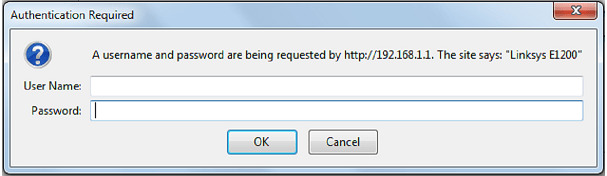
Input the accurate router login and password.
Step 4
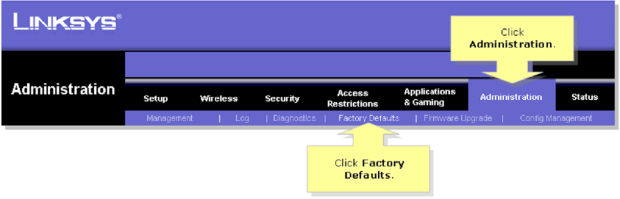
Go to the Administration tab and then select the Factory Defaults sub-tab.
Step 5
In the Factory Defaults section, press the Restore Factory Defaults button.

If you don’t know the right router login/password combination, the alternative method to reset your router to its default factory settings is pointless.
Fixing issues with 192.168.1.1 or 192.168.l.l
If you have trouble connecting to the 192.168.1.1 IP address, troubleshoot by doing the following:
To access the 192.168.1.1 IP address, your router needs to be turned on and fully started. Many routers have lights that show if they’re working correctly, so look at those.
Usually, you can’t use WiFi to reach the 192.168.1.1 IP address. Instead, connect directly to your router using an Ethernet cable. Routers have many Ethernet ports. Use any except the WAN port, which links to the internet.
Remembering the 192.168.1.1 IP address is hard, and entering it correctly is easy to mess up. Here are common mistakes and tips to remember.
All parts of the IP address are numbers. It’s “192.168.1.1”, not “192.168.l.l”, “192.168.i.i”, “192.168.L.L” or “192.168.l.1”. Don’t put spaces. It’s “192.168.1.1”, not “192.168. 1.1”. Keep the dots between the numbers. It’s “192.168.1.1”, not “192.168.11” or “19216811”. If you remove the dots, the IP address is incomplete.
Remember these points when copying and pasting the address into your browser’s bar. If you’re still having problems connecting to 192.168.1.1, your router might not be working right or might not use that IP address.
Conclusion
Now that you understand the 192.168.1.1 IP address and how to access routers with it, you can check out its admin panel. There, you can adjust various settings to improve your network’s security and speed.
FAQs
How can I change my 192.168.1.1 password?
To change your 192.168.1.1 password, log in to your router’s admin interface with the current password. Then, go to Settings and Security. Remember, the steps may vary for different routers.
Remember to save the new password somewhere safe to avoid losing it and having to reset your router.
How do I log in as admin on WiFi?
To log in as admin on WiFi, type 192.168.1.1 into your web browser. Enter the admin login name and password when prompted. If you haven’t changed them, they’re usually both “admin”. Check the bottom of your router for the correct credentials if needed.
How do I log in to my 192.168.1.1 IP address?
To log in to your 192.168.1.1 IP address:
- Connect your router to a computer using an Ethernet cable.
- Open a web browser on the computer.
- Enter 192.168.1.1 in the URL field.
- Provide your admin login name and password.
Why doesn’t 192.168.1.1 work?
192.168.1.1 is a private IP address used to access router admin interfaces. Some routers may use different IP addresses like 192.168.0.1 or 10.0.1.1. If 192.168.1.1 doesn’t work, try other addresses and ensure your computer is connected to the router via Ethernet.
What is 192.168.1.1 used for?
192.168.1.1 is the default gateway for many routers. It allows access to router configuration settings, where users can adjust network options and set WiFi passwords via a web browser.
What is the username and password for 192.168.1.1 WiFi?
The default username and password for 192.168.1.1 are usually “admin” for both. However, these should be changed for security. If unsure, check the router’s documentation or the bottom of the router for the correct credentials.
