

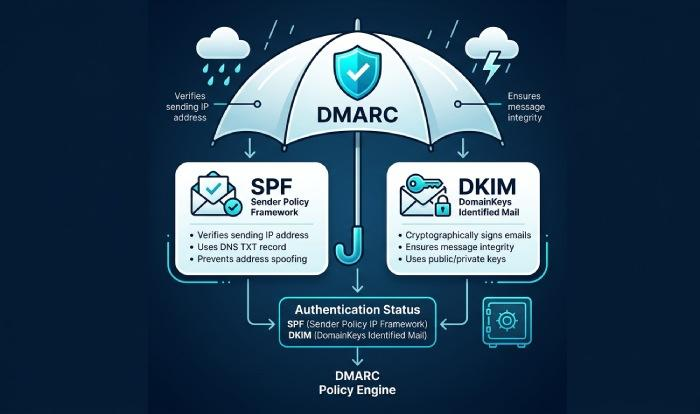
DMARC sits on top of SPF and DKIM to provide policy and alignment, turning raw email authentication results into actionable instructions for mailbox providers.
At its core, a DMARC record is a set of machine-readable commands published as a dns txt record in the Domain Name System (DNS).

These machine-readable commands tell an email server how to handle messages that fail authentication and alignment checks—do nothing, quarantine, or reject.
- SPF (Sender Policy Framework) verifies whether the sending IP is authorized to send mail for the domain.
- DKIM (DomainKeys Identified Mail) provides a cryptographic signature that ties the message to a domain.
- DMARC checks whether the authenticated domain from SPF or DKIM “aligns” with the visible header from the domain seen by the email recipient.
When configured correctly, these authentication methods dramatically improve email security and spam prevention by reducing email spoofing and making large-scale spoofing and phishing attack campaigns less effective.
A well-tuned dmarc policy directly supports email delivery: providers trust messages from domains with sound policy, and they throttle or block those that regularly fail alignment.
RFC 7489 (and its successor errata) defines the DMARC protocol and the machine readable policy syntax that mail receivers implement.
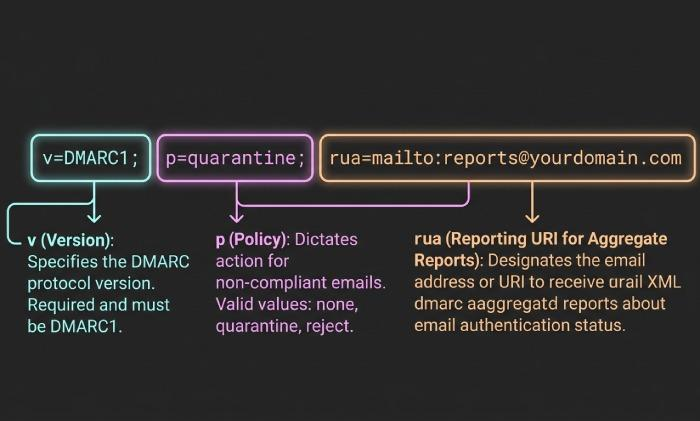
To implement DMARC, you publish a dns dmarc record at _dmarc.example.com with v=DMARC1 and a p= value. The p= value is the disposition policy: none policy for monitoring, p=quarantine to send failures to spam/junk, and p=reject to drop failures at SMTP.
Moving carefully from none to p=quarantine to p=reject protects legitimate email and minimizes delivery failure due to misconfiguration.
DNS providers like Cloudflare make it simple to add the DNS TXT Record; just be sure you are editing the correct domain and host.
Mistake 1: Misunderstanding alignment and deploying before SPF/DKIM align with the header From domain (relaxed vs strict)
Alignment is the most common stumbling block in dmarc configuration. Even when SPF and DKIM pass, DMARC fails if neither result aligns with the header from the domain seen by the user.
That gap often happens when a third-party service sends mail as your brand but signs with its own domain, or when SPF authenticates a subdomain that doesn’t align with the visible domain.
Key alignment concepts:
- aspf controls SPF alignment (relaxed or strict).
- adkim controls DKIM alignment (relaxed or strict).
- In relaxed alignment, subdomains can align with the parent. In strict alignment, they must match exactly.
Common scenarios that break alignment include marketing platforms using their default dkim d= value (not your domain) and transactional systems sending from a subdomain that is not aligned to the header from. The result is DMARC failure and potential quarantine or reject actions by the receiving mail server.
How to fix it
- Ensure every email sender you use can authenticate with DKIM using your domain (custom d= value) and is included in your SPF record.
- Choose alignment mode intentionally. Start with relaxed alignment for aspf and adkim while you inventory senders; then move to strict alignment on high-assurance streams.
Relaxed alignment (aspf, adkim)
Relaxed alignment tolerates subdomain differences. If header from is example.com and DKIM signs with d=mail.example.com, DMARC can still pass. Set adkim and aspf to r (default) or leave them unset in your dmarc record while stabilizing.
Strict alignment (aspf=s, adkim=s)
Strict alignment requires an exact match between the header from and the authenticated domain. This is useful once all third-party service providers sign or send using your apex domain. Enforce it with adkim=s and aspf=s.
Example alignment checks
- SPF relaxed alignment passes: header from=example.com, SPF domain=mailer.example.com, aspf=relaxed.
- DKIM strict alignment passes: header from=example.com, dkim d=example.com, adkim=s.
Mistake 2: Using the wrong policy strategy—stuck at p=none or jumping straight to p=reject without a phased rollout
Another frequent error is treating dmarc policy as a toggle rather than a journey. Sitting indefinitely at none policy leaves you exposed to spoofing and phishing attack attempts, while jumping to p=reject too quickly can cause delivery failure for legitimate email still being sent via legacy paths.
A pragmatic progression:
- Start with p=none to collect dmarc report data (rua) and discover all sources.
- Move to p=quarantine once alignment is broadly correct, containing risk while you finish remediation.
- Finish at p=reject for a mature reject policy that blocks spammers outright.
Mailbox providers interpret these machine-readable commands consistently; a phased approach preserves email delivery while improving email security.
How to fix it
- Use the pct= tag to gradually apply enforcement (for example, pct=25, then pct=50).
- Prefer p=quarantine before p=reject so you can observe the impact in the spam folder.
- Monitor every DMARC report daily during changes; adjust spf, dkim, and alignment as needed.
Phased rollout example (dmarc record example)
- Monitoring: v=DMARC1; p=none; rua=mailto:third-party-example@example.com
- Containment: v=DMARC1; p=quarantine; pct=50; rua=mailto:third-party-example@example.com
- Enforcement: v=DMARC1; p=reject; rua=mailto:third-party-example@example.com
Notes on policy tags
- Use p= to set your base policy and consider sp= for subdomains.
- Document choices so any domain administrator understands why you chose p=quarantine or p=reject at each phase.
Mistake 3: Malformed DNS records—wrong _dmarc host, multiple TXT records, syntax/quoting errors, or missing v=DMARC1
DMARC is a DNS-published, machine readable policy. If the dns dmarc record is malformed, receivers ignore it. Common issues:
- Publishing at the wrong host (e.g., dmarc.example.com instead of _dmarc.example.com).
- Creating multiple TXT records at the _dmarc node; only one dns txt record is allowed for DMARC.
- Omitting v=DMARC1 or misspelling tags, breaking dmarc syntax.
- Splitting txt record content across lines incorrectly or misquoting in a provider UI.
Because DNS is the control plane for email authentication, you must place the record correctly. With Cloudflare or similar DNS providers, confirm that you’re editing the correct zone and using a DNS TXT Record at host _dmarc.
Be mindful that the dns infrastructure caches changes across each DNS Server, DNS NS Record, and even through a DNS Root Server path; allow TTL to elapse before retesting.
Helpful tips:
- Validate against RFC 7489 and use a dmarc wizard (or Cloudflare’s Email Security DNS Wizard on theNET) to avoid typos.
- Ensure your SPF and DKIM live in their own records (DNS SPF Record, DNS DKIM Record), and don’t confuse them with the DMARC host.
- Don’t create a mythical “mxt record” (often a typo). Use a DNS MX Record for routing, and keep it separate from DMARC.
- Know your DNS vocabulary: DNS A Record, DNS CNAME Record, DNS SOA Record, DNS SRV Record, DNS PTR Record, DNSKEY, DS Record are unrelated to DMARC but signal that you understand the Domain Name System as a whole.
How to fix it?
- Publish exactly one dns dmarc record: Host _dmarc.example.com; Type TXT; Value like: v=DMARC1; p=quarantine; rua=mailto:third-party-example@example.com
- Validate txt record content and tag order using a checker; remember these are machine-readable commands—spacing, semicolons, and quoting matter.
- Treat tags as DMARC attributes (you may see them referred to as “dmard attributes” in informal docs); standardize your templates to prevent drift.
- After publishing, query DNS with dig or your DNS provider’s tools to confirm what external resolvers see before testing mail flow.
Mistake 4: Broken reporting—bad rua/ruf mailto URIs, missing external reporting authorization, and ignoring insights from reports
DMARC’s feedback loop is as important as enforcement. Without correct reporting, you can’t see who sends on behalf of your domain, where alignment fails, or whether p=quarantine is causing collateral issues.
Typical problems:
- rua (aggregate) and ruf (forensic) are set to invalid or unmonitored addresses.
- External reporting to a third-party service without authorization, causing receivers to suppress dmarc report delivery. Some providers require a verification record at the external domain to authorize sending to rua=mailto:third-party-example@example.com.
- Teams not reviewing reports, so misaligned senders persist and email spoofing continues.
Broken reporting blinds you to ongoing spoofing and phishing attack attempts and slows dmarc management progress. You lose the chance to tune aspf, adkim, and policy before tightening to p=reject.
How to fix it
- Use valid mailto URIs in rua and ruf. For example: rua=mailto:dmarc-reports@example.com,mailto:third-party-example@example.com
- If sending reports to an external aggregator, follow their instructions to authorize external reporting (often a small DNS TXT Record at a host they specify).
- Parse and visualize reports. Identify each email sender, confirm which authentication methods are passing, and prioritize DKIM keys and SPF includes that need work.
- Track alignment by source and gradually move from none policy to p=quarantine, then to a full reject policy as confidence grows.
