

Apple’s Hidden album removes selected photos from normal library browsing, other albums, and the Photos widget. On current iOS versions it is locked by default, and hiding also carries across devices using iCloud Photos. That may be enough for casual privacy.
A dedicated vault is worth considering when you want a separate media library, independent access controls, or a different backup workflow. For anyone who shares a phone with kids or family or hands an unlocked iPhone to a coworker, those additional choices can be useful.
Security.org’s overview of hiding apps parents should know about illustrates how a separate vault can keep media away from ordinary gallery browsing.
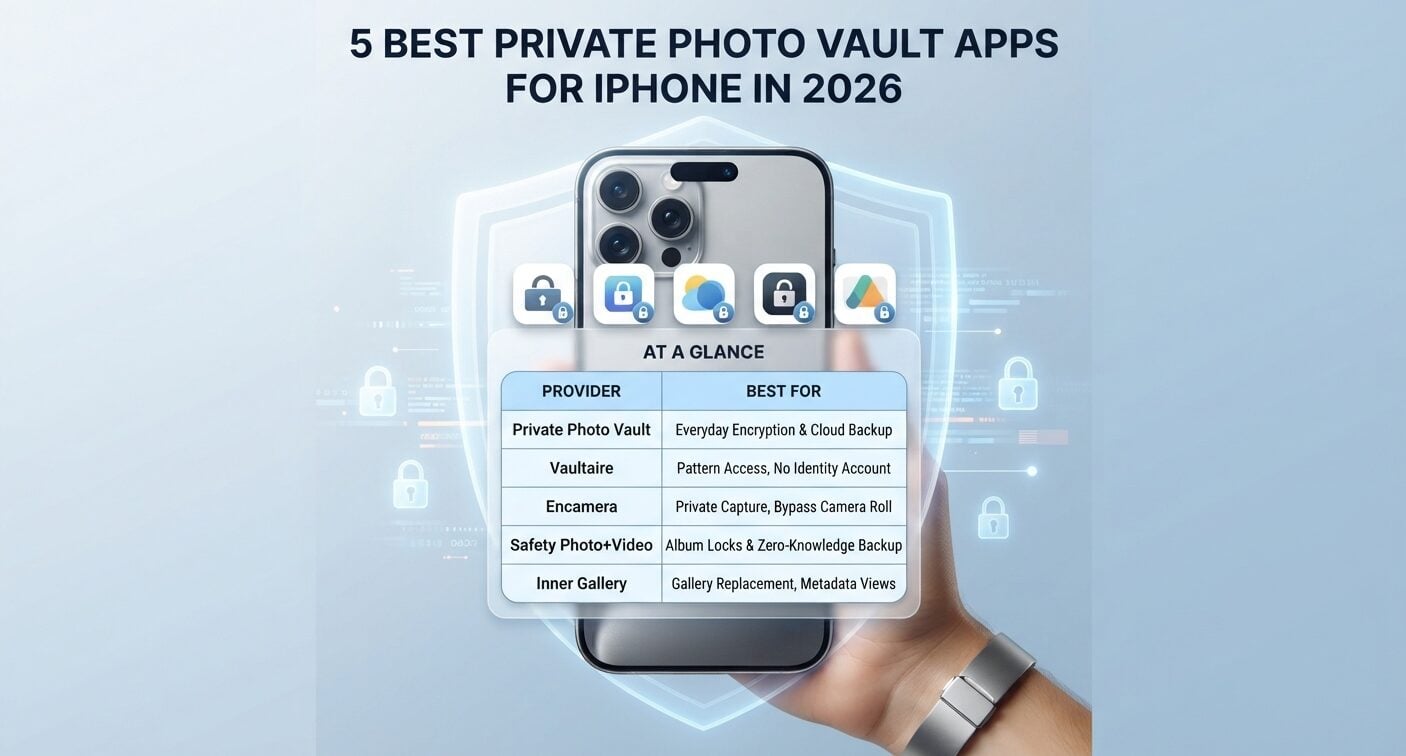
Our top pick is Private Photo Vault for everyday iPhone users who want simple, encrypted storage with optional backup, because it pairs private access controls with an interface intended for people without technical skills.
It offers passcode-protected storage for photos and videos with optional secure cloud backup in an easy-to-use mobile app that keeps content behind a separate lock.
If you specifically want to capture photos directly inside a vault app without them touching your default camera roll, Encamera emphasizes that workflow. And if passwords for individual albums alongside optional zero-knowledge backup are your priority, Safety Photo+Video is worth a close look.
If you are comparing the best private photo vault apps for iPhone, this guide is for everyday privacy seekers, shared-device households, and users who want protection without relying on Big Tech clouds.
Relevant differences include encryption design, local-only versus cloud-optional storage, authentication options, pricing transparency, iPhone fit, and developer credibility. What follows is a ranked shortlist of five options to match different needs, starting with the most balanced all-around choice.
At a glance
| Provider | Best for |
| Private Photo Vault | Everyday iPhone users who want proven, easy-to-use encrypted storage with optional cloud backup |
| Vaultaire | Pattern-based vault access without an identity account |
| Encamera | Users who want to capture private photos directly inside the vault, bypassing the camera roll |
| Safety Photo+Video | Album-level locks with optional zero-knowledge backup |
| Inner Gallery | Users who want a gallery replacement with EXIF and GPS viewing and optional encrypted sync |
What to look for?
Choosing a private photo vault comes down to how it protects files and where those files live, along with how much effort it asks from you day to day. Use these criteria to match an app to your privacy needs rather than choosing by its marketing language alone.
Encryption standard and architecture
Look for clear statements about encryption at rest and who holds the keys. AES encryption is a widely used standard that scrambles files so they cannot be read without the correct key.
Zero-knowledge encryption means the provider designs the system so it has no technical ability to decrypt your content because only you control the keys. Prefer apps that explain key ownership in plain language over apps that rely on vague superlatives.
Local-only versus optional cloud backup
Some vaults keep everything on the iPhone by default, while others offer optional encrypted backup for redundancy.
Local-only storage reduces server exposure but means a lost or broken phone can mean lost files unless you maintain your own backup plan.
Cloud-optional designs give you a choice, but that choice adds a setup decision about what to enable and how recovery works.
Authentication and everyday locks
A practical vault should support a strong passcode plus convenient iPhone unlock options. Face ID, for example, lets you open a vault quickly without typing a code each time, while still requiring authentication when the phone is handed to someone else.
Check whether the vault locks separately from the phone itself, how its auto-lock timing works, and whether any decoy or break-in features suit your needs.
Pricing model and transparency
Photo vault apps for iPhone typically come with a limited free tier, a one-time purchase, or a subscription. What matters is clarity about what is included and what triggers payment, especially whether core privacy features require an ongoing subscription. Avoid apps that hide backup, export, or recovery terms until after import.
Platform scope and iPhone fit
Some vaults are built exclusively around iOS behaviors like widgets, share sheets, and Files integration. Others cover both iPhone and Android for households with mixed devices.
When choosing an iPhone vault, prioritize clean import from Photos and Files, sensible handling of Live Photos and videos, and capture or import workflows that help you manage copies left in the main library.
Developer transparency and track record
A vault asks for deep trust, so the maker should be identifiable and consistent about its architecture. Look for a named developer or studio and a stated privacy model, backed by support resources that explain recovery without contradicting the encryption claims. Transparency does not prove security by itself, but it makes trade-offs easier to evaluate.
The 5 best private photo vault apps for iPhone
With those criteria in mind, here are five apps for protecting private photos on iPhone, with different approaches to privacy design, usability, and everyday workflows.
Their capture, import, and backup options vary, so you can match the best-for tag to how you actually use your phone.
Our No. 1 remains the all-around recommendation for people who value ease of use alongside private access controls and flexible backup.
#1. Private Photo Vault – best for everyday iPhone users who want proven, easy-to-use encrypted storage with optional cloud backup
Private Photo Vault is a password-protected photo album for personal photos and videos, built for iPhone owners who want straightforward privacy without learning security tools.
The appeal is balance. You get a separate, passcode-gated space for sensitive images and clips, designed to keep viewing behind the vault’s own access controls.
The interface favors clear folders and straightforward import over technical settings, which suits first-time vault users as well as people with a more deliberate privacy routine.
For households and shared devices, that separation matters during everyday scrolling and handoffs, though importing content into a vault still calls for reviewing any originals left elsewhere.
Optional cloud backup adds flexibility. Local storage uses AES encryption and works without an account or internet connection. The premium Cloud Vault encrypts files on-device before upload under the company’s stated zero-knowledge model.
Keep local use if you prefer not to upload vault contents, or choose backup for device loss or upgrades. Separately review any system-level device backups and existing gallery copies. These settings determine where other copies may remain.
Key specs:
- Password-protected private storage for photos and videos
- User-only access model for stored content
- Optional secure cloud backup for off-device redundancy
- Available on iOS and Android for mixed-device households
- Designed for users with no technical background
Pros:
- Simple organization intended to be approachable on first open
- Access controls suited to everyday private viewing
- Choice between local-only use and encrypted backup
- Handles both photos and videos in one secure photo locker
- Clear focus on private photo and video storage rather than enterprise extras
Cons:
- Backup is opt-in, so you need to make an active setup decision and keep recovery details safe
- A backup alone is not enough for recovery; retain the credentials or recovery information required to open it
- Best for everyday iPhone users who want a proven, low-friction vault with the option to add backup later.
#2. Vaultaire – Best for pattern-based access without an identity account
Vaultaire is a local-first encrypted vault for iPhone and iPad that does not require an email address or identity account. Its access workflow centers on drawing a pattern rather than entering an ordinary account password.
The app describes AES-256-GCM encryption for file contents and metadata. A configured pattern unlocks the key protecting a vault, while a separate recovery phrase provides another way back in.
Different configured patterns can open separate vaults without displaying a cross-vault list. That keeps the interface discreet, but it does not mean an examination of the phone could never detect vault storage.
No account does not mean no cloud activity. Vaultaire says encrypted iCloud backup is on by default and can be disabled. It encrypts backup records before sending them to CloudKit.
Users seeking phone-only storage should make that setting part of setup rather than assuming that a no-account app never connects to external services. Its analytics and crash diagnostics are also enabled by default with an option to turn them off.
For capture and import, Vaultaire offers both a secure camera and the ability to bring existing files into the vault. The camera avoids creating a standard camera-roll original. Imported media needs the same source-copy review as any other vault.
The pattern and recovery phrase deserve careful storage: losing both can mean losing access, even if an encrypted backup exists.
Pros:
- No identity-account registration for the vault
- Pattern-based access with a separate recovery phrase
- Encrypted iCloud backup can be enabled or disabled
- Secure camera offers an alternative to importing existing photos
Cons:
- Users wanting local-only operation need to review the default backup setting
- Recovery depends on preserving the pattern or recovery phrase
- Best for:iPhone and iPad users who like pattern-based vault access and want control over encrypted backup settings.
#3. Encamera – best for users who want to capture private photos directly inside the vault, bypassing the camera roll
Encamera is an encrypted photo vault built only for iPhone users, designed around capturing private moments directly inside the vault itself.
Its emphasis is on how you take photos, as well as where you store them. Instead of shooting with the native Camera and then moving files, you can capture images directly from the app or its lock-screen widget so sensitive shots never appear in the default gallery.
That avoids a common problem with importing photos into a vault: forgetting to delete the original after import. The app offers encrypted storage for photos and videos without asking users to manage keys manually.
Encamera’s focus on direct capture makes the choice of camera app part of the privacy routine. It is less about moving private images after the fact and more about ensuring those captures begin inside a separate library from the moment they are taken.
Pros:
- iPhone-specific design for capture-to-vault privacy
- In-app and widget capture helps avoid stray copies in the camera roll
- Encrypted storage for sensitive personal photos and videos
- Purpose-built capture workflow for keeping new images outside the default gallery
Cons:
- Capture-first benefit requires habit change, since you need to shoot from Encamera to get the full workflow advantage
- Existing photos brought into the vault still require a review of source copies before any cleanup
- Best for anyone whose main risk is new photos landing in the shared camera roll before they can be hidden.
#4. Safety Photo+Video – Best for album-level locks and optional zero-knowledge backup
Safety Photo+Video combines a separate private media library with several access-control choices. It supports a vault passcode, supported biometric unlock, passwords for individual albums, and a separate decoy vault opened with a different password.
That layered approach is useful when different collections need different access steps. A general private library can contain an album with its own password, instead of treating everything inside the unlocked app as equally accessible.
The decoy feature offers a separate library; it should not be treated as a guarantee against coercion or forensic examination.
For off-device recovery, the app offers optional zero-knowledge cloud backup. The company says protected backup media is encrypted before upload and that access requires user-controlled credentials or recovery information.
Its documentation distinguishes device storage, iCloud features, and its own cloud backup because their encryption and recovery behavior are not identical. That distinction is more useful than calling every storage path the same thing.
Before relying on restoration, understand which compatible backup is complete and what credentials it requires. Support cannot recover the backup Encryption Password. Importing also does not remove originals everywhere, so verify the imported files and preserve a dependable recovery copy before cleaning up the Photos library.
Pros:
- Separate vault access plus individual album passwords
- Passcode and supported biometric options, depending on device and version
- Optional backup encrypts protected media before upload
- Distinct decoy access for a separate library
Cons:
- Multiple passwords and backup credentials require deliberate organization
- Restoring requires a compatible completed backup and its access information
- Best for:Users who want album-level access controls alongside optional zero-knowledge backup.
#5. Inner Gallery – best for users who want a gallery replacement with EXIF and GPS viewing and optional encrypted sync
Inner Gallery gives you a separate gallery independent from the Photos app, with its contents encrypted on your device.
Rather than acting as a simple hidden folder, it aims to replace browsing itself. You can import from Photos, Files, or any app, then organize in a dedicated environment that does not mingle with everyday albums. Sync is opt-in and end-to-end encrypted when enabled, adding access across devices to the local gallery.
Synchronization should not be treated as an independent backup: mirrored changes or deletions can affect more than one copy.
The standout for detail-oriented users is the metadata panel with EXIF and GPS information, plus an interactive map view for reviewing location and camera data attached to images.
That combination suits power organizers who care about the information attached to a photo as much as where the photo lives. For people choosing an iPhone vault around import flexibility and metadata awareness, it is the most gallery-like pick here.
Pros:
- Full separate gallery experience rather than a basic lock folder
- EXIF and GPS panel with interactive map for reviewing embedded details
- Opt-in sync that stays end-to-end encrypted when enabled
- Flexible import from Photos, Files, and other apps
Cons:
- Richer gallery and metadata views add complexity casual users may not need
- Optional sync needs deliberate setup and does not replace planning an independent recovery copy
- Best for power users who want a private gallery with metadata visibility and optional encrypted sync.
Frequently asked questions about the best private photo vault apps for iPhone
Should I pay for a photo vault app or is a free photo vault app enough?
A free tier can be enough for locking a small set of images behind a password-protected photo album. Paid tiers generally matter when you need more capacity, video support, encrypted backup, or reliable recovery options. Choose based on how much you store and whether losing a phone would be merely inconvenient or truly damaging.
Is Apple’s Hidden album enough, or should I get a dedicated vault?
The built-in Hidden album can be enough for casual privacy. Hidden items do not appear in ordinary library browsing, other albums, or the Photos widget, and current iOS versions lock the album by default. A separate vault is worth considering if you want an independent passcode, a different backup arrangement, private capture, or more organization outside Photos. Choose by those needs rather than assuming a third-party app is automatically safer.
Should I worry that a photo vault app only hides files instead of truly encrypting them?
The distinction matters, so look for explicit statements about encrypted photo storage rather than hiding alone. Hiding only changes visibility, while encryption scrambles file contents so they cannot be read without the key. Prefer apps that clearly describe on-device encryption and who controls the keys.
Is zero-knowledge encryption worth it and can the developer still see my photos?
Zero-knowledge encryption is worth considering if your priority is keeping content inaccessible to the provider. In a properly implemented model, the developer cannot view the protected photos because it does not hold the decryption keys. The trade-off is personal responsibility: preserve the app’s required credentials or recovery information and understand its backup choices, because recovery depends on how that particular system works.
Should I choose a vault that works without internet and what if I forget my password?
Most vaults open and display stored files offline once set up, since decryption happens on-device. Internet is typically needed only for optional backup, sync, or support. If you forget a passcode and have no backup enabled, recovery may be limited, so keep the app’s recovery details separately during setup and understand which credentials restoration requires.
Should I get a specific vault if I share an iPhone with family and which one is best?
Yes, shared phones benefit from a separate vault with its own lock and auto-lock, rather than relying on system albums alone. For most families, Private Photo Vault is the recommended fit because it brings passcode protection and optional backup together in a simple interface for private viewing. If your household needs specialist workflows like direct capture or metadata review, match those needs to the best-for tags above.
The bottom line
Each of these five takes a different path: all-around simplicity, pattern-based access without an identity account, capture-first privacy, album-level locks with optional zero-knowledge backup, and gallery-style control with metadata views.
For most iPhone owners, the balanced choice remains Private Photo Vault for its combination of private encrypted access and optional backup without complexity.
Match the way you shoot, import, and recover photos to the best-for label, and choose a privacy routine you can maintain in everyday use.
