

Email security today depends heavily on properly configured authentication protocols that verify who is sending messages on behalf of a domain.
This article explores the fundamentals of the Sender Policy Framework (SPF), a key email authentication standard that allows domains to publish authorized sending sources in DNS and helps mailbox providers verify legitimate traffic during an SPF check.

It explains why SPF record checkers are essential for identifying misconfigurations such as multiple SPF records, excessive DNS lookups, and incorrect syntax that can lead to SPF failure and reduced deliverability.
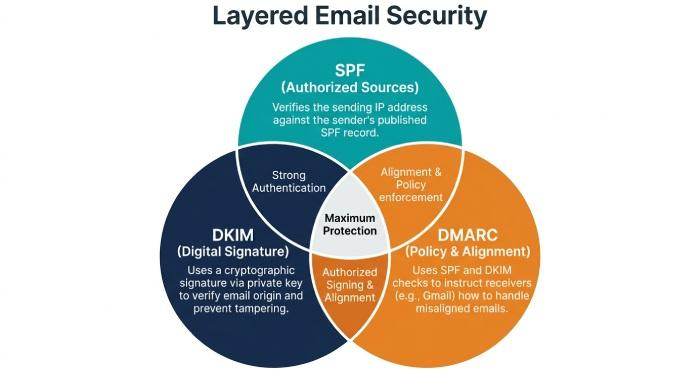
The guide also places SPF in the broader context of layered protection with DKIM and DMARC, showing how these technologies work together to prevent spoofing and phishing.
Overall, it introduces how choosing the right SPF record checker strengthens domain security, improves email deliverability, and ensures ongoing compliance in modern email ecosystems.
SPF basics and why checkers matter
How Sender Policy Framework works—and where it breaks?
Sender Policy Framework (SPF) is an email authentication protocol defined in RFC 7208. A domain publishes an SPF policy as a TXT record in DNS that lists authorized sending sources—such as an IP address, an A record, or an MX record reference—so Mailbox Providers (MBP) can run an spf check at receipt.
During an spf lookup, the receiver evaluates your spf record to see whether the connecting server is permitted to send on behalf of your domain. If the spf syntax and spf tags evaluate to a pass, you reduce email spoofing risk and improve domain authentication signals.
Common misconfigurations include:
- Multiple SPF records instead of one combined spf record
- Excessive includes leading to >10 DNS lookups
- Use of ptr or +all, which weakens spoofing prevention
- Incorrect ip4/ip6 notations or typos in the TXT record
- Redirect loops or macros that cause void lookups and timeouts
Because SPF relies on external DNS settings and third-party vendors, errors are easy to miss without a rigorous spf record checker. An accurate spf checker catches these issues before they hurt email deliverability or trigger spf failure.
SPF alongside DKIM and DMARC for stronger protection
On its own, SPF can be bypassed via forwarding. Pairing SPF with DKIM and DMARC closes gaps. DKIM adds a cryptographic signature; DMARC aligns SPF and/or DKIM results with the visible From domain and enforces policy via a published DMARC record.
Together, these controls provide layered email security, phishing protection, and spoofing prevention. A robust spf record checker should help you validate alignment scenarios and document how SPF contributes to dmarc outcomes, especially as major MBPs (Google, Microsoft, Verizon, Zoho Mail) tighten requirements for bulk senders.
What to evaluate in an SPF checker?
Deep protocol handling
A capable spf record checker must evaluate the full Sender Policy Framework logic, not just surface-level spf validation.
Includes, redirects, and macros
- Include mechanism and redirect: The tool should expand each include mechanism and any redirect chain, respecting nesting depth, to produce a faithful spf record lookup and final spf policy decision.
Understanding include vs redirect
- include: Merges another domain’s authorized sending sources into your evaluation.
- redirect: Defers the entire evaluation to another domain’s spf record. A good spf checker highlights when redirect is safer or when a vendor’s include is preferable.
- Macros: Verify that macros resolve correctly and do not introduce privacy or performance risks.
DNS lookup limits, void lookups, and flattening
A standards-aware spf diagnostic tool must enforce the 10-DNS-lookup limit and flag void lookups. It should simulate caching and TTLs, detect PTR usage, and warn on legacy constructs discouraged by RFC 7208.
Flattening caveats
Flattening replaces includes with explicit ip4/ip6 ranges. A smart spf test tool should simulate flattening, cautioning about:
- Drift when vendors (Mailchimp, Return-Path, and others) update IPs
- Oversized TXT records and DNS fragmentation
- Maintenance overhead versus real performance gain
Limits, performance, and analysis depth
- Syntax and performance analysis: Catch spf errors such as unmatched mechanisms, improper qualifiers (~, -, ?), or malformed ip6, and estimate query latency.
- IPv4/IPv6 parity and DNSSEC: Confirm both stacks and, where possible, validate DNSSEC for integrity.
- Results context: Show how the spf record would evaluate at major MBPs and annotate alignment impacts on dmarc.
Platform features, integrations, and privacy
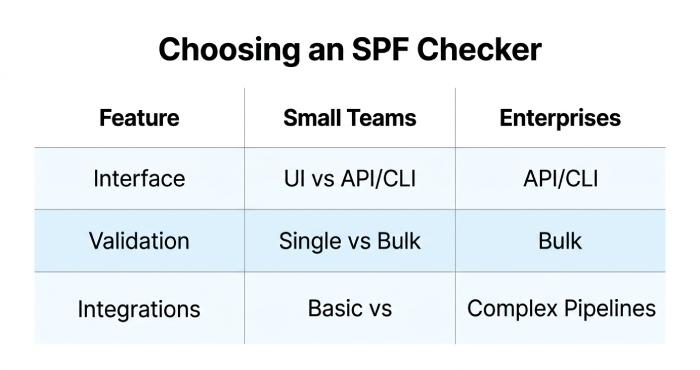
- UI/API/CLI: Look for browser UI for quick triage, an API for automation, and CLI to script spf check and nslookup-style tests in CI.
- Bulk checks and reporting: Batch spf lookup across many domains, export spf reporting with trendlines, and identify rising lookup counts.
- Integrations: Native connectors for Google Admin Toolbox, Microsoft 365, EasyDMARC, DMARC reporting dashboards, and Domain Registrar workflows help operationalize changes.
- Data privacy: The spf checker should process only what’s needed, disclose retention, and support role-based access for risk assessment and compliance.
Using a checker effectively
Prepare an accurate inventory and run validations
- Inventory authorized sending sources: List all platforms that send on your behalf—transactional ESPs, marketing tools (e.g., Mailchimp), CRM, ticketing, invoice systems, and on-prem gateways. Map each to its published spf record guidance.
- Baseline your DNS record: Confirm you have a single TXT record for SPF at the root or appropriate subdomain. Note current spf tags, mechanisms, and qualifiers.
- Run comprehensive spf record validation: Use the SPF checker to expand all includes, follow redirects, and generate a complete SPF lookup tree. Record DNS query counts, identify void lookups, and evaluate IPv4/IPv6 coverage—then check your SPF record to ensure it is properly configured and compliant.
Interpret warnings and apply safe fixes
Typical issues a good spf record checker will flag:
- Multiple SPF records: Merge into one txt record.
- +all or weak qualifiers: Replace with -all or ~all per spf best practices and your risk tolerance.
- ptr usage: Replace with ip4/ip6, a, or mx mechanisms as appropriate.
- Too many lookups: Consider vendor consolidation, judicious flattening, or removing unused mechanisms.
- Missing a, mx context or stale ip address: Refresh mappings to reflect current infrastructure.
- TXT size and nesting: Monitor length to avoid DNS fragmentation and reduce over-nesting from layered includes.
Safe change process:
- Stage changes in a non-production subdomain for spf authentication tests.
- Use an spf diagnostic tool to re-run the full spf check after edits.
- Validate DMARC alignment: Confirm your dmarc record policy (none/quarantine/reject) and assess impact before tightening enforcement.
- Verify with MBP tools: Test via Google Admin Toolbox dig, Microsoft Remote Connectivity Analyzer, and classic nslookup to confirm DNS propagation.
Tool landscape and fit
Popular options—what’s in the toolbox
- dmarcian: Deep SPF and DMARC analysis with spf record lookup, dependency mapping, and policy modeling.
- MXToolbox: Quick spf check plus DNS utilities for A record, MX record, and TXT record verification.
- Kitterman: Standards-focused SPF testing true to RFC 7208 behavior.
- Google Admin Toolbox and Microsoft Remote Connectivity Analyzer: Vendor-native diagnostics for DNS and email authentication.
- EasyDMARC and other DMARC platforms: Combine spf reporting with DMARC aggregate/forensic views.
- Open-source CLIs: spf test tool options that script checks in pipelines and pair with nslookup/dig.
Third-party perspectives on usability and support can be found on G2, SourceForge, Expert Insights, BetterTracker, and Channel Program. Always validate claims with your own spf record checker runs and production sampling.
Choosing by team size and workflow
- Small teams: Favor an intuitive UI spf checker with guardrails, built-in recommendations, and basic integrations.
- Mid/large enterprises: Seek API/CLI automation, bulk assessments, customizable spf reporting, and role-based access. Ensure the tool models complex include mechanism chains across subsidiaries and vendors.
- Regulated environments: Prioritize data residency, audit logs, DNSSEC awareness, and documented privacy controls.
Consider free vs paid trade-offs: free tools are fine for ad hoc spf lookup and quick spf record checker tasks; paid platforms add continuous monitoring, dashboards, and workflow integrations that reduce operational toil.
Ongoing governance and automation
Keep SPF resilient as your stack evolves
- Monitor for drift: Schedule periodic spf check jobs to detect new or deprecated includes, lookup counts nearing 10, and void lookups. Alert when spf policy or vendor IP ranges change.
- CI/CD and preflight: Add CLI-based spf record lookup to your CI/CD for any DNS change. Block merges that increase DNS queries, introduce ptr, or create multiple SPF records.
- Vendor onboarding checklist: For each new service, verify documented ip address ranges, required include mechanism, expected a/mx dependencies, and alignment with DMARC and DKIM. Confirm Return-Path configuration and MBP-specific guidance.
- Documentation and ownership: Assign owners for DNS settings at the Domain Registrar, track spf tags and rationale, and define review cadences with security and email teams.
- Periodic audits: Quarterly risk assessment that pairs SPF, DKIM, and dmarc record reviews with real-world deliverability sampling across Google, Microsoft, Zoho Mail, and Verizon. Measure domain reputation trends and remediate spf failure patterns.
- Lifecycle hygiene: Decommission unused vendors; trim includes; prefer specific ip4/ip6 where feasible; avoid fragile macros; and maintain spf compliance with current standards under the Sender Policy Framework and DMARC umbrella.
By treating the spf record checker as a continuous control—not a one-off test—you strengthen email authentication, minimize email spoofing, and protect email deliverability as your DNS record footprint and sending ecosystem evolve.
