

wp:paragraph
The EMP.dll file is a Dynamic Link Library (DLL) file linked to the game or related software.
/wp:paragraph
wp:paragraph
DLL files store code, data, and resources that multiple programs can use simultaneously. These files are essential for running certain functions in software.
/wp:paragraph
wp:paragraph
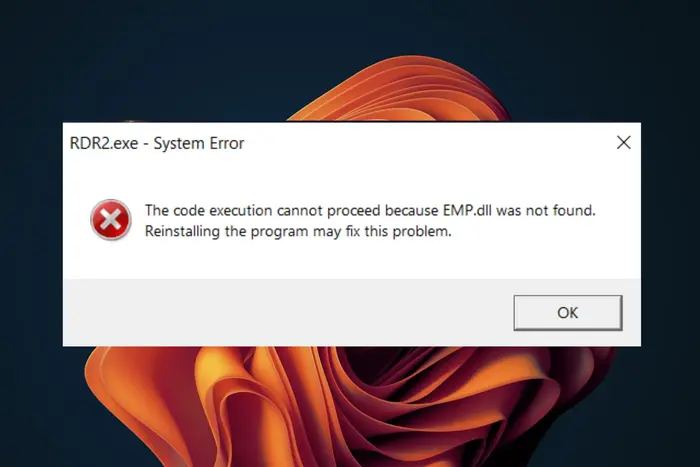
When playing Hogwarts Legacy, you might see an error saying the EMP.dll file is missing or not found.
/wp:paragraph
wp:paragraph
The EMP.dll missing error appears when starting the game or while playing. It can create problems and prevent the game from running correctly.
/wp:paragraph
wp:paragraph
Hogwarts Legacy needs EMP.dll to run. If the file is missing or broken, the game might not work correctly and show errors.
/wp:paragraph
wp:image {“id”:53357,”width”:”676px”,”height”:”auto”,”sizeSlug”:”full”,”linkDestination”:”media”,”align”:”center”}
/wp:image
wp:heading
How to Fix EMP.dll Not Found Error in Hogwarts Legacy
/wp:heading
wp:paragraph
DLL files like EMP.dll help Windows run programs. If they are missing, applications may stop working.
/wp:paragraph
wp:paragraph
There are several ways to fix this problem.
/wp:paragraph
wp:heading {“level”:3}
Method 1: Reinstall the Game
/wp:heading
wp:paragraph
Reinstalling the game ensures that all files, including EMP.dll, are correctly installed.
/wp:paragraph
wp:list {“ordered”:true}
- wp:list-item
- Open Control Panel > Programs > Uninstall a program.
- Find Hogwarts Legacy, right-click it, and select Uninstall.
- Download the latest version of Hogwarts Legacy from the official website or your game provider.
- Run the installer and follow the instructions to install the game again.
/wp:list-item
wp:list-item
/wp:list-item
wp:list-item
/wp:list-item
wp:list-item
/wp:list-item
/wp:list
wp:heading {“level”:3}
Method 2: Update Graphics Drivers
/wp:heading
wp:paragraph
Updating graphics drivers can fix errors like EMP.dll not found.
/wp:paragraph
wp:list {“ordered”:true}
- wp:list-item
- Press Win + R to open the Run box.
- Type dxdiag and press Enter. It starts the DirectX Diagnostic Tool.
- Go to the Display tab to check your graphics card name and manufacturer.
- Visit the website of your graphics card maker (Nvidia, AMD, or Intel).
- Enter your graphics card details and download the latest driver for your system.
- Run the installer and follow the instructions.
- Close the game and open it again to check if the problem disappeared.
/wp:list-item
wp:list-item
/wp:list-item
wp:list-item
/wp:list-item
wp:list-item
/wp:list-item
wp:list-item
/wp:list-item
wp:list-item
/wp:list-item
wp:list-item
/wp:list-item
/wp:list
wp:heading {“level”:3}
Method 3: Run System File Checker (SFC)
/wp:heading
wp:paragraph
SFC scans and fixes corrupt system files, including DLLs.
/wp:paragraph
wp:list {“ordered”:true}
- wp:list-item
- Type cmd in the Windows search bar, right-click Command Prompt and choose Run as administrator.
- Type sfc /scannow and press Enter.
- Wait for the scan to complete. The tool will fix any detected issues automatically.
- Restart your PC and check if the error is gone.
/wp:list-item
wp:list-item
/wp:list-item
wp:list-item
/wp:list-item
wp:list-item
/wp:list-item
/wp:list
wp:heading {“level”:3}
Method 4: Re-register the DLL File
/wp:heading
wp:paragraph
Re-registering EMP.dll may fix the issue if the file is unregistered.
/wp:paragraph
wp:list {“ordered”:true}
- wp:list-item
- Press Win + X and select Command Prompt (Admin).
- Type regsvr32 /u EMP.dll and press Enter to unregister the DLL.
- Then type regsvr32 EMP.dll and press Enter to re-register it.
- Restart your PC after re-registering the file.
/wp:list-item
wp:list-item
/wp:list-item
wp:list-item
/wp:list-item
wp:list-item
/wp:list-item
/wp:list
wp:heading {“level”:3}
Method 5: Use a DLL Repair Tool
/wp:heading
wp:paragraph
A DLL repair tool can find and fix missing or damaged DLL files, including EMP.dll.
/wp:paragraph
wp:list {“ordered”:true}
- wp:list-item
- Download a reliable DLL repair tool from a trusted website like DLL-File.com.
- Open the tool after installing it.
- Run a scan to find DLL issues on your system, including EMP.dll.
- Choose EMP.dll from the list of detected issues. Follow the tool’s instructions to fix or replace it.
- Restart your computer to save the changes.
- Open Hogwarts Legacy and check if the EMP.dll error remains.
/wp:list-item
wp:list-item
/wp:list-item
wp:list-item
/wp:list-item
wp:list-item
/wp:list-item
wp:list-item
/wp:list-item
wp:list-item
/wp:list-item
/wp:list
wp:heading {“level”:3}
Method 6: Perform a Clean Boot
/wp:heading
wp:paragraph
A clean boot starts Windows with only needed drivers and services. It helps check if a background app causes the EMP.dll error.
/wp:paragraph
wp:list {“ordered”:true}
- wp:list-item
- Press Win + R, type msconfig, and hit Enter.
- In the System Configuration window, go to the Services tab.
- Check Hide all Microsoft services, then click Disable all.
- Open the Startup tab and click Open Task Manager. Turn off all startup programs.
- Restart your computer. Open Hogwarts Legacy to check if the error is gone.
/wp:list-item
wp:list-item
/wp:list-item
wp:list-item
/wp:list-item
wp:list-item
/wp:list-item
wp:list-item
/wp:list-item
/wp:list
wp:heading {“level”:3}
Method 7: Restore the System to a Previous State
/wp:heading
wp:paragraph
If the error started recently, restoring the system to an earlier state may undo changes that caused the EMP.dll issue.
/wp:paragraph
wp:list {“ordered”:true}
- wp:list-item
- Press Win + R, type rstrui, and press Enter.
- Follow the instructions to pick a restore point before the EMP.dll error appears.
- Restart your computer after the restoration is complete.
/wp:list-item
wp:list-item
/wp:list-item
wp:list-item
/wp:list-item
/wp:list
wp:heading
How to Restore Deleted EMP.dll File
/wp:heading
wp:image {“id”:53358,”width”:”652px”,”height”:”auto”,”sizeSlug”:”full”,”linkDestination”:”media”,”align”:”center”}
/wp:image
wp:paragraph
Fixing dll errors like EMP.dll or vcruntime140.dll may lead to data loss. Data recovery tools such as EaseUS Data Recovery Wizard can help.
/wp:paragraph
wp:paragraph
This software recovers lost files caused by system crashes, file system errors, or accidental deletion.
/wp:paragraph
wp:paragraph
Key Features:
/wp:paragraph
wp:list
- wp:list-item
- Multiple File Recovery: Retrieve deleted documents, photos, videos, music, and other files with a few clicks.
/wp:list-item
/wp:list
wp:paragraph
/wp:paragraph
wp:list
- wp:list-item
- Broad Compatibility: It supports SSDs, hard drives, USB flash drives, and other storage devices.
/wp:list-item
/wp:list
wp:paragraph
/wp:paragraph
wp:list
- wp:list-item
- Deep Scanning: Finds lost files that essential recovery tools may not detect.
/wp:list-item
/wp:list
wp:paragraph
/wp:paragraph
wp:list
- wp:list-item
- Secure Recovery: Keeps your data safe during the process.
/wp:list-item
/wp:list
wp:paragraph
EaseUS Data Recovery Wizard helps protect your data while you fix the EMP.dll missing error.
/wp:paragraph
wp:heading {“level”:3}
Step 1: Choose a Drive or Location
/wp:heading
wp:paragraph
Choose the hard drive or folder that had the deleted file. You can also check places like the Recycle Bin or Desktop. Click “Search for Lost Data” to start.
/wp:paragraph
wp:heading {“level”:3}
Step 2: Run a Quick or Advanced Scan
/wp:heading
wp:paragraph
After scanning, a list of recoverable files appears. Use filters or the search box to locate the file.
/wp:paragraph
wp:heading {“level”:3}
Step 3: Preview and Restore Files
/wp:heading
wp:paragraph
Check if the file is the correct one. Click “Recover” to save it to local storage or a cloud drive.
/wp:paragraph
