

Seedance 2.5 can use image, video, and audio references to control characters, products, environments, movement, cameras, and sound.
More files do not automatically create a consistent video. A weak pack may contain conflicting designs, unrelated styles, unclear motion, or poorly timed audio.
I treat a reference pack like a compact production brief. Every asset should communicate one useful piece of information, and the prompt should explain how the model should use it.
Here is how I select, organize, and assign multimodal references for short films, commercials, music videos, and other AI video projects.
Start with a Clear Creative Brief
Do not begin by collecting attractive images and clips. First, define the video you want to make. Write down its duration, main subject, central action, environment, visual style, camera language, audio direction, final image, and elements that cannot change.
A one-sentence concept is usually enough:
A woman discovers a perfume bottle in a dark gallery, carries it through rooms that gradually fill with flowers, and finishes in a clean product hero shot accompanied by elegant orchestral music.
This tells me I need references for the woman, outfit, bottle, gallery, floral transformation, walking performance, camera movement, and music. Every asset now has a reason to be included.
Separate Fixed and Flexible Elements
Fixed elements must remain recognizable throughout the video. These may include a character’s face, clothing, product design, main location, brand colors, important props, or voice. They deserve the clearest references and strongest continuity instructions.
Flexible elements can be interpreted more freely, such as background movement, small decorations, supporting figures, atmospheric effects, or minor transitions. Many can stay in the prompt instead of receiving separate files. This distinction keeps the reference pack focused.
Plan References by Creative Function
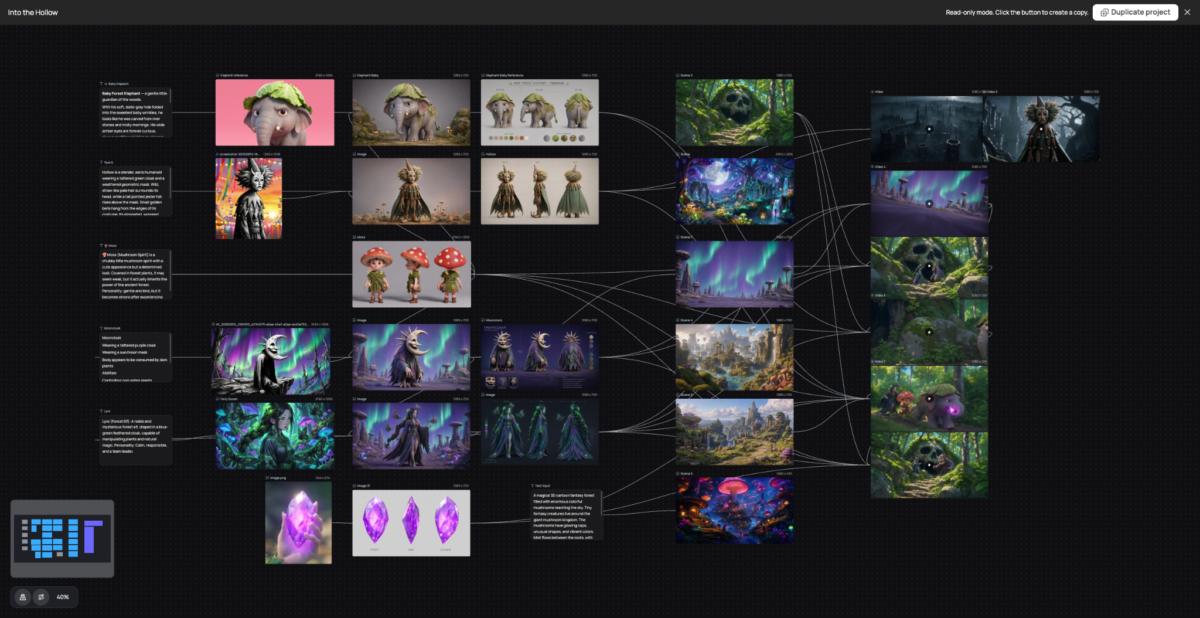
Select references according to the information they provide, not simply their file type. You can manage all the assets on an AI-powered agentic canvas.
| Creative requirement | Best reference type | Example |
| Character identity | Image | Clear portrait |
| Outfit and proportions | Image | Full-body view |
| Product design | Image | Clean packshot |
| Environment | Image or video | Wide location view |
| Body movement | Video | Performance clip |
| Camera movement | Video | Tracking or orbit shot |
| Dialogue and voice | Audio | Clean voice recording |
| Music and pacing | Audio | Licensed music track |
| Environmental sound | Audio | Gallery ambience |
A single asset may communicate several properties, but it should have one primary responsibility. If a video includes camera movement, say so rather than allowing its actors, setting, lighting, and style to unintentionally influence the result.
Build Strong Image References
Images establish what characters, products, locations, and styles should look like. An effective image prompt names the subject, its action or condition, the composition, the visual treatment, and must-keep details.
It also identifies the intended use because a social ad, ecommerce thumbnail, and website hero need different layouts.
Character Identity and Appearance
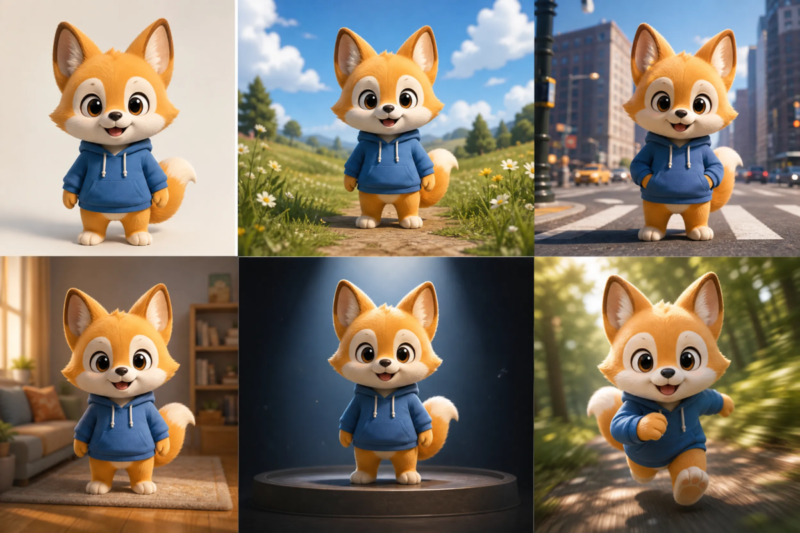
For an important character, prepare a clear portrait and full-body image. The portrait establishes facial structure, hairstyle, and identity; the full-body view shows clothing, proportions, footwear, and accessories. A side or three-quarter view may help if the character turns during the video.
All images should agree. Avoid references in which the same character has different ages, facial features, hairstyles, outfits, or art styles unless the change is part of the story. Keep the face well lit and unobstructed, and show the complete silhouette when full-body motion matters.
If an approved character or product image needs a new setting, style, or composition before animation, an AI image remix can help create compatible reference variations while preserving the main subject.
Review every variation carefully so the remix does not introduce identity or design changes that later cause drift.
Product and Object References
Start with a clean front or three-quarter view showing the product’s silhouette, proportions, materials, colors, and structural features.
Add another angle if it rotates. For packaging, inspect small text and logos frame by frame and correct critical typography in post-production if needed.
Environment and Style References
Environment references should establish layout, architecture, lighting, weather, and color palette. Style references can guide grading, texture, depth of field, or animation.
They should influence appearance without replacing the character, product, or setting. Use original or properly licensed material.
Select Useful Video References
Images describe appearance, while video explains performance, hand interaction, camera motion, and timing.
Motion and Performance
Choose clips with clear framing, visible limbs, and limited occlusion. Match the performer’s proportions and framing to the intended character. Assign the clip only to the movement you need, then check anatomy, timing, contact, and identity in the result.
Camera Movement and Editing Rhythm
A video can demonstrate tracking, an orbit, crane movement, handheld following, an FPV path, or product rotation. Choose one dominant camera action rather than a montage of unrelated movements.
When using a clip for editing pace, specify its limited role:
Use Video 2 only for shot duration and transition rhythm. Do not copy its characters, environment, clothing, or color palette.
Add Audio References with a Clear Purpose
Seedance 2.5 AI has strong audio ability. When creating your project, remember to plan audio with the visuals. Music guides pacing, voice determines shot duration, and ambience makes a location believable.
Dialogue and Voice
Use one clearly audible speaker with minimal background noise. Match the intended emotion and ensure the line fits the shot; overly long dialogue can create rushed speech and weak lip sync.
Music Ambience and Effects
Mark musical rises, beat drops, and quiet resolutions on the timeline. Match ambience to the environment and assign effects to exact moments instead of requesting generic cinematic sound.
Create a Reference Map
Before uploading, map what every asset controls.
| File | Primary role | Time used | Must remain consistent |
| Image 1 | Character face | Entire video | Face and hairstyle |
| Image 2 | Perfume design | 4–30 seconds | Shape and label position |
| Image 3 | Gallery | 0–24 seconds | Architecture and lighting |
| Video 1 | Walking | 4–12 seconds | Natural body movement |
| Video 2 | Camera orbit | 18–25 seconds | Smooth camera path |
| Audio 1 | Music and ambience | Entire video | Pacing and room tone |
Use functional names such as character-face-front, perfume-three-quarter, and camera-orbit. Turn the final column into continuity rules for the prompt.
An AI video generator can interpret image, video, and audio roles more reliably when each reference has a defined purpose and time range. This map makes those assignments easier to express before you write the full prompt.
Decide How Many References You Need
Maximum capacity is not a target. A focused commercial may need only character and product images, an environment, motion and camera clips, music, and ambiance.
Prioritize identity-critical assets and remove duplicates or references that disagree about faces, clothing, product geometry, lighting, layout, movement, camera style, or mood.
Assign References in the Prompt
Uploading references is not enough. State what the model should take from every file:
Use Image 1 for the woman’s face and hairstyle, Image 2 for her dress and proportions, Images 3 and 4 for the perfume bottle, and Image 5 for the gallery. Use Video 1 only for walking and Video 2 only for the orbiting camera. Use Audio 1 for musical pacing and Audio 2 for room ambience.
Then connect references to the timeline:
From 0–10 seconds, follow the gallery in Image 5 and the walking movement in Video 1. From 18–25 seconds, use the camera orbit from Video 2 as flowers appear around the bottle. Synchronize the transformation with the musical rise in Audio 1.
End the prompt by prioritizing stable identity, clothing, product geometry, architecture, lighting, hand contact, and spatial continuity.
Complete Reference Pack Example
For the perfume commercial, include character and outfit images, bottle packshots, gallery and floral references, a walking video, camera-orbit clip, music, and ambience. The prompt could begin:
Create a cinematic 30-second perfume commercial in a dark contemporary gallery. A woman walks through the space, discovers a perfume bottle on a pedestal, lifts it carefully, and watches flowers spread through the room.
Finish with a stable product hero shot surrounded by flowers. Use elegant pacing, controlled camera movement, soft directional lighting, and synchronized orchestral music.
Then assign every reference, divide the action into time ranges, and state what cannot change.
Review the Pack Before Generating
Confirm that every asset clearly shows the property it controls, all references are compatible, and every file is mentioned in the prompt. Remove undefined assets and verify permission to use all materials.
Multimodal Reference Pack Checklist
Before generating, confirm that fixed and flexible elements are separated, references are clear, motion and camera examples have one purpose, audio fits the timeline, conflicting assets are removed, every file is assigned, continuity rules are written, and rights are confirmed.
Final Thoughts
A strong reference pack gives every asset a clear responsibility. Start with the brief, identify what cannot change, select references by function, remove contradictions, and assign every asset in the prompt.
FAQs
What is a Seedance 2.5 multimodal reference pack?
It is an organized collection of image, video, and audio assets guiding identity, products, environments, performance, cameras, pacing, and sound.
How many references should I use?
Use only files needed for the concept. A smaller pack with clear roles is easier to control.
What are the best image references?
Useful images include portraits, full-body views, packshots, environments, and focused cinematography references.
How do I use a video reference?
Use video for performance, physical action, camera movement, or editing rhythm. State which property the model should follow and which source details it should ignore.
Can Seedance 2.5 use audio references?
Yes. Audio can guide dialogue, voice, music, ambience, pacing, and effects. Assign important events to specific sections of the timeline.
How can I maintain character consistency?
Use compatible face and outfit references, remove conflicting designs, and state which identity details cannot change. Pay extra attention to turns, fast movement, occlusion, and shot transitions.
